

Sibelius 2 Playback
These pages refer solely to the upgrade from Sibelius 1.x to Sibelius 2. All the improvements and many more are incorporated in the more recent upgrade to Sibelius 6.

New time position and tempo readouts during playback
Rubato™ and Rhythmic feel™
Rubato complements Espressivo, subtly altering the tempo just like a real musician would; a choice of six settings is provided.
Rhythmic feel modifies the notated rhythm and/or accent beats to suit different music styles, adding an extra dimension to the playback of your music. There are 16 different settings, from reggae to Viennese waltz! Swing and swung sixteenths (semiquavers) are provided as rhythmic feels, and you can change rhythmic feel at any point in the music - so you can now switch swing on and off mid-score.
The new Performance dialog lets you control all the main playback settings from a single place. It brings together the existing Espressivo and reverb functions with the new Rubato and Rhythmic feel features, and also lets you control the playback of slurred and unslurred notes.
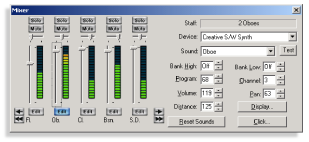
The Mixer replaces the Sounds dialog, and lets
you fine-tune playback in real time
Rits, accels and glissandos
Sibelius 2 reads rits & accels: you can set the length of the rit./accel., specify the end tempo, and even specify the tempo change 'curve'. Sibelius 2 also plays back glissandos (chromatic, white-note, black-note or continuous) and various new guitar tab notations such as bends.
More playback improvements
Trills and tremolos play back much more realistically, and you can make trills start on the upper note. Hairpins now get louder/softer by a percentage factor, so they sound better by default.
The playback dictionary has been greatly expanded, with many more terms in several languages. You can change now sound mid-staff, just by typing e.g. Change to piccolo. Various other words are more intelligent: writing mute produces different sounds on trumpet and violin.
Because Sibelius 2 lets you hide any object, you can produce even subtler playback using hidden hairpins, slurs, pedaling, harmonic notes, etc. You can even hide whole passages of notes for 'improvised' solos! You can make individual notes silent, and slashes are now silent automatically.
Quick links
Take a tour
Take a tour of the vast number of new features and enhancements in Sibelius 2.
Playback
