

Creating Music in Sibelius 2
These pages refer solely to the upgrade from Sibelius 1.x to Sibelius 2. All the improvements and many more are incorporated in the more recent upgrade to Sibelius 6.
Mouseless input
You can now create text, time signatures, etc. as you input notes, and Sibelius will automatically position them for you - no need to use the mouse! In fact, you can now use almost every feature of Sibelius - including copying and pasting, and moving lines and staves - without ever touching the mouse.
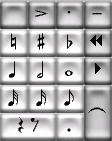 |
Cycle through the five keypad layouts with these new buttons. |
| Edit Note has been removed, so all keypad buttons now change the selected note(s) immediately. New buttons give quick access to grace notes, guitar tab notations, and 3 custom articulations. | |
Note input
Step-time and alphabetic input now show a moving cursor, so there's never any doubt as to where you are. The keys 1-9 and Shift-1-9 add an interval above/below a note to make a chord (an extension of the N key) - and this even works on passages: just select a bar and hit 8 to turn it into octaves! You can also add notes by note name to make chords, using Shift-A-G.
Multicopy
The new Multicopy feature is a real time-saver, allowing you to make multiple copies of a piece of text, a passage of music or any other object(s) at once, either horizontally (along the same staff) or vertically (onto more than one staff). Just select the passage where you want the copies to go, and Sibelius fills it with copies.
For example, Multicopy can be used to copy dynamics right down a band or orchestra, or to fill several bars with a repeating ostinato figure.
The R key (for repeating notes) now also repeats passages, text, lines, symbols, imported graphics, etc.
Lyrics
Import lyrics from a word processor: just copy them to the clipboard, then paste them word by word into Sibelius. You can also copy whole lines of lyrics from Sibelius to other parts of the score, or into other programs.
When editing lyrics, you can now move between syllables with the arrow keys - no need to select each syllable individually to edit it. If you change to e.g. bold/italic while typing lyrics, the change stays for subsequent lyrics - ideal for temporary italics such as a chorus.

Slash notes don't play or transpose, and you can edit the behavior of any noteheads. New notehead types for silent notes and stemless notes
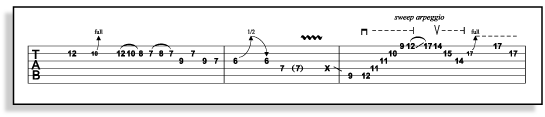
Sibelius includes comprehensive guitar tab notations such as bend,
pre-bend, slide,
hammer-on, pull-off, vibrato bar scoop/dip/dive and return, palm rake,
bracketed notes
and more. Many of these notations are 'magnetic' and also play back
Scanning
Sibelius 2 includes a free upgrade of PhotoScore Lite 2, and
you can purchase PhotoScore Professional 2 at a special discount with your Sibelius 2 upgrade. (If you already have PhotoScore Professional,
you can upgrade it to version 2 as a separate purchase from www.neuratron.com.)
In both PhotoScore Lite and Professional 2, scanning of hairpins, slurs
and time signatures and importing of these to Sibelius is much improved.
You can now choose which instruments to use for different staves, and
also scan transposing scores.
PhotoScore Professional 2 has greatly improved text scanning, using special technology licensed from one of the world's leading text OCR companies. Fingerings, chord symbols, bold and italic are all now detected. Rhythm detection is also improved - e.g. triplets are read even when there is no number 3 written.
Magnetic tuplets
Tuplets are now 'magnetic' (like slurs), so they are intelligently positioned, even after transposing music. The new 'auto-bracket' feature automatically hides tuplets along beams. Tuplets can even be flipped, like slurs, by hitting X.
File conversion
Sibelius 2 now opens Finale 2002 ETF files, and SCORE file conversion has been greatly enhanced, including conversion of transposing scores, multirests, guitar tab notation and more.
Quick links
Take a tour
Take a tour of the vast number of new features and enhancements in Sibelius 2.
Creating music
