

Sibelius 3 Power tools
These pages refer solely to the upgrade from Sibelius 1.x and 2.x to Sibelius 3. All the improvements and many more are incorporated in the more recent upgrade to Sibelius 6.
Auto page breaks
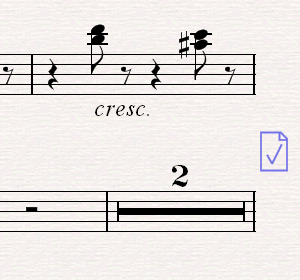
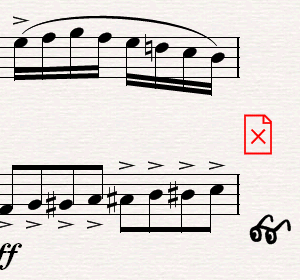
This remarkable feature puts page turns at convenient places for you in extracted parts. There are various useful options such as how many bars rest to allow for a turn - and if there isn't a convenient place, Sibelius can warn the player by writing 'V.S.' or drawing spectacles in the margin!
Auto page breaks are automatically updated, so Sibelius will instantly find new page turns whenever you change the music or layout.
 Auto page breaks: view
movie » (Flash, 540K)
Auto page breaks: view
movie » (Flash, 540K)
Below: auto page break after multirest
Below: there is no convenient page turn,
so Sibelius draws warning specs instead (this is optional)
Plug-ins
Sibelius 3 includes no fewer than 30 extra plug-ins, now in a new main menu, plus many improvements to existing ones. The new Scales & Arpeggios plug-in (below) will keep instrumental students busy for months!

It creates a complete set of scales and arpeggios from a huge range of possibilities - you can specify any key or progression of keys (e.g. circle of fifths), double in octaves or thirds, use different clefs, write for single-staff or keyboard instruments, etc. As well as major and minor it includes diminished/dominant/ minor 7th arpeggios, modal scales (e.g. dorian), jazz scales (e.g. lydian flat 7), numerous exotic scales such as octatonic, Japanese pentatonic, and more.
Other new plug-ins include:
- Lyrics: apply traditional lyrics beaming, add slurs to melismas, and ensure lyrics are aligned along every staff
- Realize Figured Bass
- Realize Chord Symbols - create accompaniments from lead sheets etc.
- Add Drum Pattern: writes a drum kit for you in a wide range of styles …and many more!
Scorch
Scorch now has an optional 'split view' so you can see the next system before the page turns. This lets you use your screen as a music stand and play along. You can also view music a system at a time so it fits on the screen, while still printing complete pages.
Scorch includes most of the new Sibelius features, such as live playback and colored objects. You can even make lead sheets and jazz scores play back with hidden accompaniments and realizations. Plus there's a new plug-in which turns a folder of scores into a complete indexed Scorch web site.
Plug-ins
Sibelius 3 includes no fewer than 30 extra plug-ins, now in a new main menu, plus many improvements to existing ones. The new Scales & Arpeggios plug-in (below) will keep instrumental students busy for months!
It creates a complete set of scales and arpeggios from a huge range of possibilities - you can specify any key or progression of keys (e.g. circle of fifths), double in octaves or thirds, use different clefs, write for single-staff or keyboard instruments, etc. As well as major and minor it includes diminished/dominant/ minor 7th arpeggios, modal scales (e.g. dorian), jazz scales (e.g. lydian flat 7), numerous exotic scales such as octatonic, Japanese pentatonic, and more.
Other new plug-ins include:
- Lyrics: apply traditional lyrics beaming, add slurs to melismas, and ensure lyrics are aligned along every staff
- Realize Figured Bass
- Realize Chord Symbols - create accompaniments from lead sheets etc.
- Add Drum Pattern: writes a drum kit for you in a wide range of styles …and many more!
Scorch
Scorch now has an optional 'split view' so you can see the next system before the page turns. This lets you use your screen as a music stand and play along. You can also view music a system at a time so it fits on the screen, while still printing complete pages.
Scorch includes most of the new Sibelius features, such as live playback and colored objects. You can even make lead sheets and jazz scores play back with hidden accompaniments and realizations. Plus there's a new plug-in which turns a folder of scores into a complete indexed Scorch web site.
Files
When you open a MIDI file, the music is now notated using 2 voices, just like Flexitime. The original velocities and timings are preserved, which you can play back and edit just as if you'd inputted using Flexi-time. Saving a MIDI file also saves these velocities and timings, and other new playback enhancements such as complex repeats all work equally well with MIDI files.
By popular request, Sibelius 3 can save in Sibelius 2 format, so you'll remain compatible with other users even if they don't upgrade.
Save as Graphics can now export TIFF files, and there are new options to specify dpi resolutions directly, adjust the staff size to improve the quality, and output in monochrome to reduce file size.
Sibelius 3 can save all the lyrics from your score into a single text file, and now also opens Finale 2004 ETF files.
We've replaced Transfer Saving with a new system which makes it easy to use your copy of Sibelius on two different computers without typing in long numbers.
Kontakt Player Gold is the advanced version of Kontakt Player Silver, which has many more high-quality sounds for playback and for creating CDs with Save as Audio Track. Kontakt Player Silver is included with Sibelius 3, but you can buy Kontakt Player Gold as an optional extra, at a special discount if ordered with your upgrade.
Kontakt Player Gold includes 64 pitched sounds and 110 unpitched percussion sounds, covering orchestral, band, vocal, jazz, etc. - such as Piccolo, Flugelhorn, Baritone Horn, solo and sectional brass and strings, string techniques (e.g. sul ponticello tremolo), male and female voices and choirs, guitars, handbells, etc.Additional sound libraries are coming soon.
Kontakt Player Gold also lets you use up to 32 different sounds in the same score (Kontakt Player Silver is limited to 8), and has extra sound options.
Hear for yourself just how realistic Kontakt Player Gold sounds by viewing our Flash demos:
High
quality » (3.7M)
Low
quality » (1.9M)
Quick links
Take a tour
A comprehensive guide to the new features in Sibelius 3
