

Sibelius 3 Notation & engraving
These pages refer solely to the upgrade from Sibelius 1.x and 2.x to Sibelius 3. All the improvements and many more are incorporated in the more recent upgrade to Sibelius 6.
|
Optical™ spacing
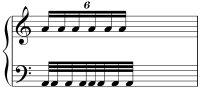
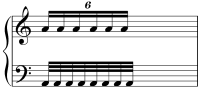
Assisted by several of the world's leading music engravers, we have devised an entirely new note spacing algorithm for Sibelius 3 - Optical spacing. It's designed to ensure that when notes are widely spread, their spacing is unaffected by obstacles such as accidentals; but when space is tight, notes, accidentals, leger lines, lyrics, etc. all pack together as close as possible without touching. Space is only added when required, and is removed again when no longer needed, e.g. if you delete an accidental.
This revolutionary algorithm also greatly enhances the spacing of tuplets and crossrhythms between staves, with further improvements to lyrics. Advanced users have precise control over all the intricacies, thanks to numerous adjustable options.
 Optical Spacing: view
movie (Flash, 230K)
Optical Spacing: view
movie (Flash, 230K)
Beaming
Sibelius 3 has completely revised rules for beaming notes into groups, based on the time signature and context; it handles almost every situation perfectly for you. But should you want to adjust the beaming rules, a sophisticated new dialog lets you set beam groups and subgroups of any length (e.g. 4, 6), or choose to beam from, over and to rests. There are also new options for breaking beams around tuplets, and for using horizontal beams throughout particular staves (e.g. percussion or guitar tab).
Text
You can now change the text font of all text styles at once, with the new Edit All Fonts dialog. There are new plug-ins to find and replace text, to reposition text (e.g. fingerings) away from notes, and to revise dynamics en masse.
Guitar
You can now add your favorite guitar frames to libraries, for re-use in other scores. They also now automatically transpose, and a new menu option lets you step through alternative fingerings for any chord.
Color
 You
can now change the color of almost anything in the score - notes, text,
lines, symbols, etc. This is particularly useful for educational music,
marking up sketches, and for making important markings (e.g. repeats
and rehearsal marks) stand out. They print in color, too.
You
can now change the color of almost anything in the score - notes, text,
lines, symbols, etc. This is particularly useful for educational music,
marking up sketches, and for making important markings (e.g. repeats
and rehearsal marks) stand out. They print in color, too.
Colored objects: view
movie » (Flash, 322K)
User Guide & help
The Sibelius 3 User Guide has been completely updated, and almost every page revised to make it an even easier read than ever. We've also made it optional for Sibelius 2 users, so if you don't want a new User Guide, you needn't pay for one - we'll send you a booklet about just the new features instead.
On-screen help is also completely revised. It's now searchable, and pops up in a moment.
Other improvements
Among many other enhancements, you can now drag the right-hand end of systems to indent them; create 'system' symbols which are extracted into all parts (e.g. for codas, segnos or pauses above barlines); and position system text with the arrow keys or using Align in a Row/Column.
Quick links
Take a tour
A comprehensive guide to the new features in Sibelius 3
